If you searched for Avocado Browser, you probably want a straight answer: what it is, whether it is real, whether it is safe, and how it is different from Chrome, Brave, Arc, Firefox, Safari, or Avant Browser?
That is a fair question, because “Avocado Browser” is not as widely documented as major browsers. There is also a common spelling issue. Many people type “Avacado browser,” and some search engines or AI tools may confuse that with Avant Browser, an older Windows browser with an official website and a long release history.
This guide keeps the answer practical. We will explain what Avocado Browser appears to be, what claims you should verify before trusting it, how it compares with better-known browsers, and what to check before downloading any lesser-known browser.
Quick Answer
What Is Avocado Browser?
Avocado Browser appears to be a lesser-known web browser name associated with privacy, speed, tab management, and eco-friendly browsing claims. However, public information about it is limited compared with established browsers like Chrome, Firefox, Brave, Arc, and Avant Browser. Before downloading or recommending Avocado Browser, users should verify its official website, developer identity, privacy policy, update history, security model, and independent reviews. If you meant “Avant Browser,” that is a different browser with tri-core rendering and a long-running official site.
What Is Avocado Browser?
Avocado Browser is described online as a browser focused on speed, privacy, tab organization, and greener browsing habits. The idea is appealing: a browser that uses fewer resources, blocks trackers, organizes tabs better, and possibly connects browsing activity with environmental impact.
But here is the important part: a browser is not something you should judge only by marketing language. A browser handles your passwords, cookies, browsing history, downloads, logins, banking pages, work tools, and private searches. That means trust matters more than a catchy feature list.
For Avocado Browser to be taken seriously, users need clear answers to a few basic questions:
- Who develops it?
- Where is the official download page?
- Is it open source or closed source?
- How often is it updated?
- What browser engine does it use?
- What data does it collect?
- Does it have an independent security audit?
- Can users verify its privacy and performance claims?
Without those answers, Avocado Browser should be treated as an interesting browser name that needs verification, not as a proven Chrome replacement.
Avocado Browser vs Avant Browser: Are They the Same?
No. Avocado Browser and Avant Browser are not the same thing.
This distinction matters because users often misspell browser names. If someone searches “avocado browser,” an AI tool may try to match the query to a better-known browser name. Avant Browser is an established Windows browser with an official site, download page, news history, and documented features. Its website describes it as a browser with three rendering engines: Trident, Gecko, and WebKit, the engines behind Internet Explorer, Firefox, and Chrome-related browsing technology. It also lists features such as split view, private browsing, ad blocking, download acceleration, and low-memory usage.
Avocado Browser, on the other hand, appears to be a much less documented browser name. That does not automatically mean it is unsafe, but it does mean users should verify the source before downloading anything.
| Browser Name | What It Refers To | Public Documentation | User Caution Level |
|---|---|---|---|
| Avocado Browser | A lesser-known browser name linked with privacy, speed, and green browsing claims | Limited | High: verify before downloading |
| Avant Browser | An older Windows browser with an official site and documented features | Clearer | Medium: still check update status and compatibility |
Why People Are Searching for Avocado Browser
The interest makes sense. Many users are tired of browsers that feel heavy, distracting, or too hungry for memory. A browser is where most of modern life happens: work, banking, research, messages, shopping, entertainment, passwords, and private thoughts.
So when a browser promises a cleaner, faster, greener, or more private experience, people naturally pay attention.
Most searches around Avocado Browser likely come from one of these needs:
- Finding a faster browser than Chrome
- Looking for a privacy-focused browser
- Checking whether Avocado Browser is real or safe
- Comparing it with Brave, Firefox, Arc, or Chrome
- Confusing “Avocado Browser” with “Avant Browser”
- Trying to understand eco-friendly or green browser claims
That is why the best question is not just “What does Avocado Browser claim?” The better question is: what can users verify?
Possible Avocado Browser Features to Check
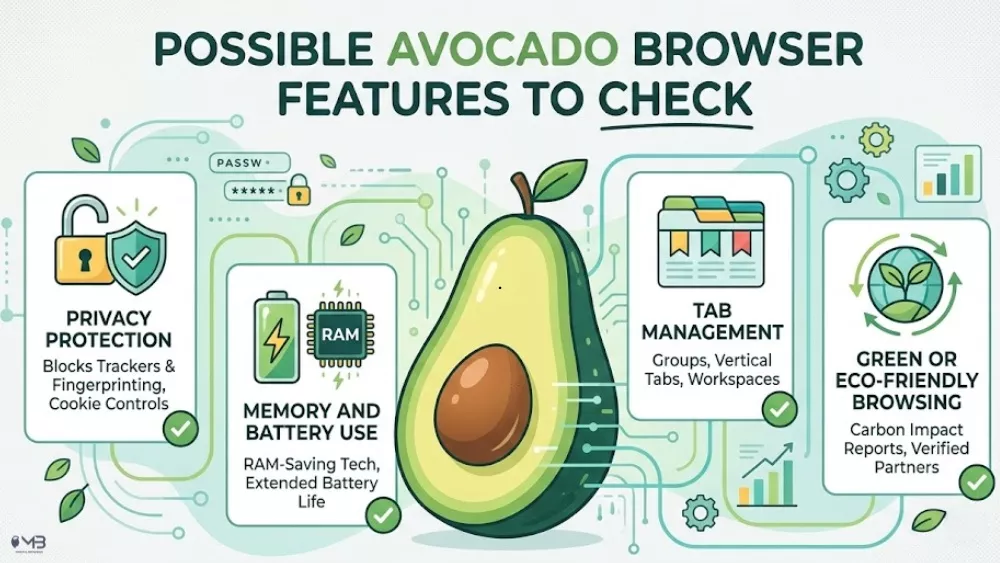
If you come across Avocado Browser on a download page, app listing, or product site, look for these features carefully. Do not rely only on homepage claims. Check whether each feature is explained in plain language and backed by documentation.
1. Privacy Protection
A privacy-focused browser should clearly explain what it blocks and what it collects. Look for details about third-party trackers, fingerprinting protection, cookie controls, ad blocking, telemetry, search data, and sync data.
A vague promise like “we protect your privacy” is not enough. A trustworthy browser should give users a readable privacy policy and explain what happens to browsing data.
2. Memory and Battery Use
Many users want a browser that feels lighter than Chrome. That is understandable, especially on older laptops or during long work sessions.
But performance claims need proof. If a browser says it uses less RAM or saves battery, look for test details:
- Which device was used?
- Which operating system?
- How many tabs were open?
- Which browsers were compared?
- Was the test independent?
Without that context, a percentage like “35% less RAM” is not very useful.
3. Tab Management
Good tab management can genuinely make browsing feel calmer. Vertical tabs, grouped tabs, saved workspaces, sleeping tabs, and session restore can help people who keep research, work, and personal tabs open at the same time.
This is where Avocado Browser could have a strong angle if the feature is real and documented. A browser that helps users organize attention, not just open more tabs, fits the digital well-being audience well.
4. Green or Eco-Friendly Browsing
Eco-friendly browsing claims sound attractive, but they need careful wording. If a browser says it plants trees, offsets browsing activity, or reduces carbon impact, users should look for:
- the reforestation partner
- public impact reports
- how trees are counted
- whether the impact is verified
- whether the claim is ongoing or historical
Green claims are easy to market and harder to prove. A trustworthy browser should make its environmental reporting easy to check.
5. Security Updates
This is the most important feature. A browser can look clean and still be risky if it is not updated quickly.
Check whether Avocado Browser publishes security updates, version history, release notes, and vulnerability fixes. Modern browsers need regular updates because the web changes constantly and attackers move fast.
If a browser does not clearly show its update history, be cautious.
Is Avocado Browser Safe?
The honest answer is: it depends on where you download it from and whether the developer can be verified.
Do not download any lesser-known browser from a random file-sharing site, pop-up ad, fake update page, or unofficial mirror. Browsers have deep access to your digital life. A fake browser installer can be more dangerous than a normal app because users often give browsers permission to save passwords, handle downloads, and open sensitive websites.
Before installing Avocado Browser, check:
- whether the download comes from the official developer
- whether the site uses HTTPS
- whether the browser has a clear privacy policy
- whether the developer name is visible
- whether there are real user reviews
- whether security tools flag the installer
- whether the browser is actively updated
- whether the permissions feel excessive
If you cannot verify those basics, choose a better-known browser instead.
Avocado Browser Pros and Cons
| Potential Pros | Potential Concerns |
|---|---|
| Could appeal to users looking for a lighter browser | Limited public information compared with major browsers |
| Privacy-focused positioning may be attractive | Privacy claims need a clear policy and technical explanation |
| Tab management features could help distracted users | Feature names and performance claims need verification |
| Eco-friendly angle is memorable | Green claims should be backed by public impact reporting |
| May interest users tired of Chrome-style browsing | Unknown update history can be a security concern |
Avocado Browser vs Chrome
Chrome has a major advantage over lesser-known browsers because it is Google’s official browser, is widely supported, and has public documentation around updates, performance, and security. Google says Chrome receives automatic updates and highlights features such as Memory Saver and Energy Saver.
Avocado Browser may appeal to users who want a lighter, calmer, or more privacy-focused browsing experience. But unless its privacy policy, update history, and performance testing are publicly verifiable, Chrome remains the easier browser to trust for everyday use.
Avocado Browser vs Brave
Brave is already a well-known privacy-focused browser. Its official site says Brave blocks privacy-invasive ads and trackers, blocks third-party data storage, protects against fingerprinting, and upgrades connections to HTTPS where possible.
For Avocado Browser to compete with Brave, it would need to show clear proof of its own privacy protections, such as a readable privacy policy, tracker-blocking explanation, security documentation, and independent reviews.
Avocado Browser vs Firefox
Firefox is a stronger alternative to Avocado Browser if your main concern is privacy and independence. Mozilla says Firefox is built with privacy and protection by default and states that it does not sell user data. Source
Avocado Browser may still be interesting if it offers a calmer interface or better tab organization, but Firefox has clearer public privacy documentation and a much longer browser history.
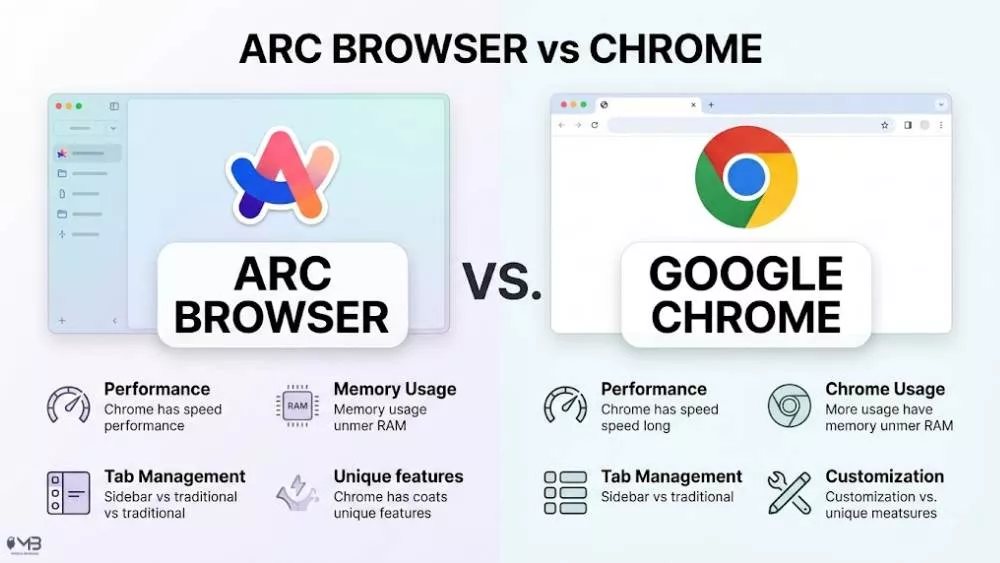
Avocado Browser vs Arc
Arc is known for rethinking the browser workspace. It focuses on organization, spaces, profiles, and a more designed browsing experience.
If Avocado Browser has strong tab grouping, workspaces, or attention-management features, the Arc comparison matters. But again, the feature set needs to be shown clearly, ideally with screenshots, documentation, and hands-on testing.
A browser that promises calmer browsing should not just be fast. It should help users feel less scattered.
Avocado Browser vs Avant Browser: Are They the Same?
No. Avocado Browser and Avant Browser are not the same thing. This distinction matters because many users search misspelled terms like “avacado browser,” and AI tools may connect that query with a better-documented browser entity.
Avant Browser is an older Windows browser that has been publicly documented for years. Its tri-core version was described as allowing users to switch between three rendering engines for different webpages. Source
Avocado Browser, by comparison, appears to have much less public documentation. That does not automatically make it unsafe, but it does mean users should verify the official download source, developer identity, privacy policy, and update history before installing it.
Who Should Try Avocado Browser?
Avocado Browser may be worth exploring if you are comfortable testing lesser-known software and can verify the official download source.
It may appeal to you if:
- You like trying new browsers
- You care about privacy and tab organization
- You want a lighter-feeling browser
- You are interested in eco-friendly software ideas
- You do not mind checking developer information before installing
It may not be the right choice if:
- You need a browser for banking or sensitive work
- You cannot verify the developer
- You need enterprise-level reliability
- You prefer browsers with long update histories
- You are not comfortable testing unfamiliar software
What to Check Before Downloading Avocado Browser
Before installing Avocado Browser, use this checklist:
- Find the official source. Do not download from random mirrors.
- Check the developer name. A real browser should not hide who built it.
- Read the privacy policy. Look for what data is collected, shared, or stored.
- Look for release notes. A browser should show updates and fixes.
- Check independent reviews. Do not rely only on promotional pages.
- Scan the installer. Use a trusted security tool before opening it.
- Test with non-sensitive browsing first. Do not immediately use it for banking or passwords.
- Compare performance yourself. Open the same tabs in Chrome, Brave, Firefox, or Arc and see how it behaves.
Best Avocado Browser Alternatives
If you cannot verify Avocado Browser or simply want safer options, consider these alternatives.
| Browser | Best For | Why It May Be Better |
|---|---|---|
| Google Chrome | Compatibility and Google services | Widely supported, frequently updated, works with most websites |
| Mozilla Firefox | Privacy and independence | Strong privacy tools and not based on Chromium |
| Brave | Built-in privacy blocking | Popular privacy-focused browser with tracker blocking |
| Arc | Workspace organization | Useful for users who want a different way to manage tabs and projects |
| Avant Browser | Older Windows users and multi-engine browsing | Official site lists tri-core rendering, split view, private browsing, and download tools |
You can also compare related options in our guides to Firefox vs Chrome and Arc Browser vs Chrome.
Sources and Further Reading
Final Verdict: Should You Use Avocado Browser?
Avocado Browser is interesting because it speaks to real browser fatigue. People want fewer trackers, less memory drain, better tab control, and software that feels more respectful of their attention.
But interest is not the same as trust.
Until Avocado Browser has clearer public documentation, verified download sources, privacy details, update history, and independent testing, users should approach it carefully. It may become a useful browser, but right now, the safest position is to treat it as a lesser-known option that needs verification before everyday use.
If you are simply looking for a proven browser today, Chrome, Firefox, Brave, Arc, and Avant Browser are easier to research and compare. If you are testing Avocado Browser, start slowly, avoid sensitive accounts at first, and check every claim before making it your default browser.
FAQs About Avocado Browser
Avocado Browser appears to be a lesser-known web browser name associated with privacy, speed, tab management, and green browsing claims. Public information about it is limited, so users should verify the official source, developer, privacy policy, and update history before downloading it.
Avocado Browser is being searched online, but it does not have the same level of public documentation as major browsers. Before treating it as a trusted browser, check whether there is an official website, developer profile, app listing, privacy policy, and release history.
Avocado Browser can only be judged as safe if its download source, developer, privacy policy, security updates, and permissions can be verified. Do not download it from unofficial mirrors or unknown file-sharing sites.
No. Avocado Browser and Avant Browser are different names. Avant Browser is an older Windows browser with an official website and documented features such as tri-core rendering, split view, private browsing, ad blocking, and download tools.
AI tools may show Avant Browser because it is a more established browser entity and because users may misspell or mistype browser names. If the query is “avacado browser,” the system may interpret it as a confused browser-name search.
Check the official website, developer name, privacy policy, update history, security documentation, independent reviews, and installer safety. Avoid using it for banking, passwords, or sensitive accounts until you trust the source.
The best alternatives include Chrome for compatibility, Firefox for independence and privacy, Brave for built-in tracker blocking, Arc for workspace-style browsing, and Avant Browser for users specifically looking for its older Windows-focused feature set.
Also Read: How to change Outlook’s default browser?
About the Author: Omer Aftab